
QUAKE BLOOD SEWER
QUAKE BLOOD SEWER
This level takes place in a sewer where the water has turned to blood. The player must stop the flow to continue while battling monsters along the way.
This project is inspired by my previous Quake project, which I created in Trenchbroom a few years ago. I wanted to make a new version in Unreal Engine, aiming to improve it with the knowledge I have today.
4 Weeks / half-time
Made using Unreal Engine 5 and Blender
All Mechanics made with Blueprints except for the basic unreal engine movement
Marketplace models and animations are Enemies and Quake Boxes
Combat spaces
Enemy placements
Fast-paced gameplay
Breakdown

information
information
introduction

This level takes place in a sewer where the water has turned to blood. The player must stop the flow to continue while battling monsters along the way.
This project is inspired by my previous Quake project, which I created in Trenchbroom a few years ago. I wanted to make a new version in Unreal Engine, aiming to improve it with the knowledge I have today.
Area of focus
Combat spaces
Enemy placements
Fast-paced gameplay
4 Weeks / half-time
Made using Unreal Engine 5 and Blender
All Mechanics made with Blueprints except for the basic unreal engine movement
Marketplace models and animations are Enemies and Quake Boxes
PLAYTHROUGH
level overview
1. Arrive with elevator (Start)
1. Arrive with elevator (Start)
2. Introducing enemies
3. Foreshadowing
4. Door before key
6. Bait and switch
5. Monster closet
7. Turn on the first button
8. Get silver key, turn on the button
9. Get gold key, turn on the last button
Level Layout
Level beats
Level Loops
3. Foreshadowing
5. Monster closet
7. Turn on the first button
9. Get gold key, turn on the last button
2. Introducing enemies
4. Door before key
6. Bait and switch
8. Get silver key, turn on the button
For this project, I began by reviewing my previous level to draw inspiration from it. I gathered reference images from my old level as well as from other Quake levels and games that featured environments similar to what I envisioned. Then, I created a mind map with bubbles to outline the basic flow of the level.
pre-production
planning the level
For this project, I began by reviewing my previous level to draw inspiration from it. I gathered reference images from my old level as well as from other Quake levels and games that featured environments similar to what I envisioned. Then, I created a mind map with bubbles to outline the basic flow of the level.
Production
A lot of iterations occurred during this project as I playtested the game myself, aiming to create a combat space that felt dynamic and fast-paced. The iterations generally involved making the environment larger and more vertical to avoid it feeling too tight and flat.
Iteration of blockout spaces
A lot of iterations occurred during this project as I playtested the game myself, aiming to create a combat space that felt dynamic and fast-paced. The iterations generally involved making the environment larger and more vertical to avoid it feeling too tight and flat.
For this monster closet, I wanted to create a bit larger combat space for the player. I decided to have the bars open to the right, allowing the player to move to the other side. This design also includes a larger pillar in the middle of the room, which the player can navigate around. It provides a strategic advantage when facing the big enemy, Shambler, as they can shoot at the pillar instead of the player. To make the room more interesting, I elevated the floor slightly, making it a bit more challenging for the player to move around the pillar too easily. They now have to lose some momentum to make a shortcut jump to the other side of the pillar.
To enhance player engagement while progressing through the level, it's effective to foreshadow that events may unfold in other areas. One way to encourage players to explore more is by placing a key or other valuable item in locations behind bars where the player could see them. This not only drives them to curiosity but also creates a tension that something may happen when they pick up the item, as it is common in Quake-style levels for enemies to spawn near valuable items.
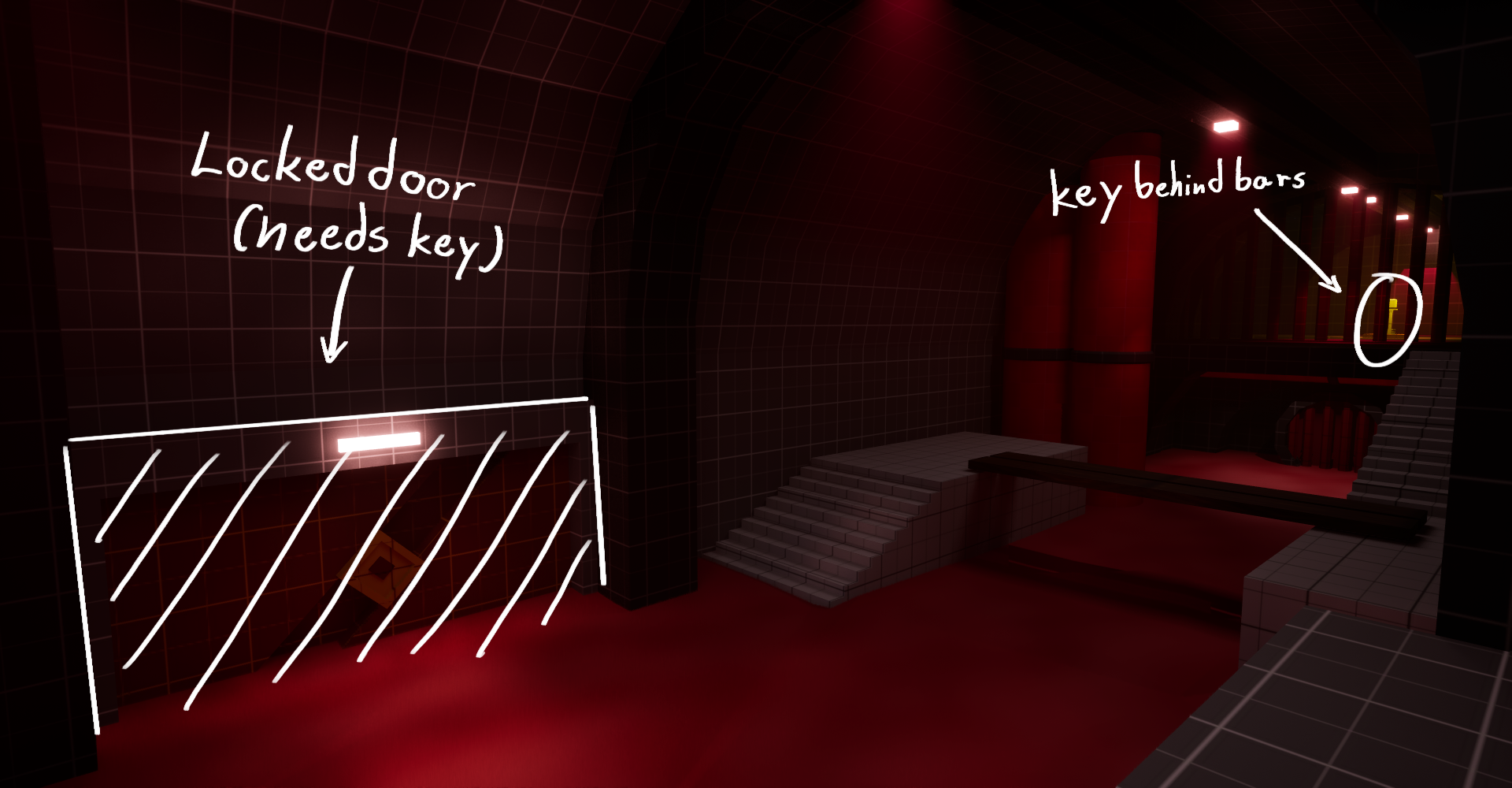
To make exploring the level feel rewarding, it's effective to show the door before the key. This approach enhances the sense of accomplishment when players find the key that unlocks the door. If they were to discover the key before seeing the door, they wouldn't experience the same level of satisfaction or progress, as they wouldn't know they needed to search for the key. By revealing the door first, you create a sense of challenge that motivates players to find the key.
To introduce the enemies in a way that allows the player to learn about their movements and the amount of damage the player can inflict, it's important to avoid making the player feel underpowered, especially since they only have a wrench and no gun. To make this process easier, the first enemy will stand still with their back turned, while the second enemy will walk away, also with their back turned. This approach ensures that the enemies do not seem threatening at first.
To make exploring the level feel rewarding, it's effective to show the door before the key. This approach enhances the sense of accomplishment when players find the key that unlocks the door. If they were to discover the key before seeing the door, they wouldn't experience the same level of satisfaction or progress, as they wouldn't know they needed to search for the key. By revealing the door first, you create a sense of challenge that motivates players to find the key.
One effective way to make items more challenging to obtain is to implement a monster closet or a similar trap. This involves locking the player in a confined area and spawning enemies inside. The player must eliminate all the enemies before the doors unlock, allowing them to progress.
To make the areas more interesting during the player's second visit, I added more enemies to increase the difficulty. This helps balance the challenge when the player has acquired a new and stronger weapon.
Level design breakdown
Level Looping
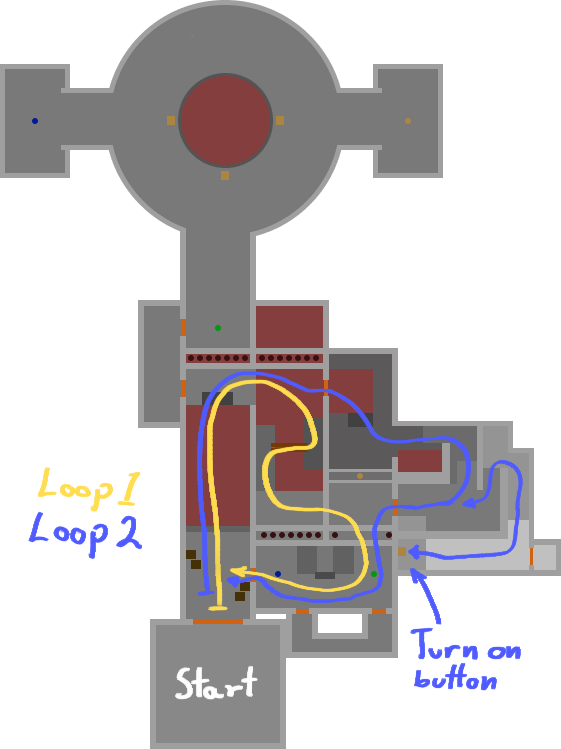
One of the primary areas of focus for this level was to create two overlapping loops within the same space. This design allows both loops to traverse the same area, making efficient use of a smaller environment. By incorporating weapons and keys along the path of the loops, along with an increased number of enemies for each loop, I aimed to make the level loop more engaging and enjoyable for the player, preventing it from becoming boring as they navigate through the same area two times.
Foreshadowing
To enhance player engagement while progressing through the level, it's effective to foreshadow that events may unfold in other areas. One way to encourage players to explore more is by placing a key or other valuable item in locations behind bars where the player could see them. This not only drives them to curiosity but also creates a tension that something may happen when they pick up the item, as it is common in Quake-style levels for enemies to spawn near valuable items.
Monster closet
One effective way to make items more challenging to obtain is to implement a monster closet or a similar trap. This involves locking the player in a confined area and spawning enemies inside. The player must eliminate all the enemies before the doors unlock, allowing them to progress.
show the door before the key
To make exploring the level feel rewarding, it's effective to show the door before the key. This approach enhances the sense of accomplishment when players find the key that unlocks the door. If they were to discover the key before seeing the door, they wouldn't experience the same level of satisfaction or progress, as they wouldn't know they needed to search for the key. By revealing the door first, you create a sense of challenge that motivates players to find the key.
Combat Design
introduce enemies
To introduce the enemies in a way that allows the player to learn about their movements and the amount of damage the player can inflict, it's important to avoid making the player feel underpowered, especially since they only have a wrench and no gun. To make this process easier, the first enemy will stand still with their back turned, while the second enemy will walk away, also with their back turned. This approach ensures that the enemies do not seem threatening at first.
monster closet trap
For this monster closet, I wanted to create a bit larger combat space for the player. I decided to have the bars open to the right, allowing the player to move to the other side. This design also includes a larger pillar in the middle of the room, which the player can navigate around. It provides a strategic advantage when facing the big enemy, Shambler, as they can shoot at the pillar instead of the player. To make the room more interesting, I elevated the floor slightly, making it a bit more challenging for the player to move around the pillar too easily. They now have to lose some momentum to make a shortcut jump to the other side of the pillar.
wave of enemies after first loop
To make the areas more interesting during the player's second visit, I added more enemies to increase the difficulty. This helps balance the challenge when the player has acquired a new and stronger weapon.
bait and switch with enemies
Making the player push a button to open a door might not seem very fun, so incorporating a bait and switch can make it more engaging. For example, when the player approaches a locked door, it triggers enemies to spawn right behind them. This forces the player to move back and notice the button to unlock the door. Once they press the button, it opens the door but also acts as a bait because a wall behind them opens up to reveal a Shambler, which then attacks the player. So both the door and button acts as bait in this case.
One effective way to make items more challenging to obtain is to implement a monster closet or a similar trap. This involves locking the player in a confined area and spawning enemies inside. The player must eliminate all the enemies before the doors unlock, allowing them to progress.
To make the areas more interesting during the player's second visit, I added more enemies to increase the difficulty. This helps balance the challenge when the player has acquired a new and stronger weapon.
One of the primary areas of focus for this level was to create two overlapping loops within the same space. This design allows both loops to traverse the same area, making efficient use of a smaller environment. By incorporating weapons and keys along the path of the loops, along with an increased number of enemies for each loop, I aimed to make the level loop more engaging and enjoyable for the player, preventing it from becoming boring as they navigate through the same area two times.
Making the player push a button to open a door might not seem very fun, so incorporating a bait and switch can make it more engaging. For example, when the player approaches a locked door, it triggers enemies to spawn right behind them. This forces the player to move back and notice the button to unlock the door. Once they press the button, it opens the door but also acts as a bait because a wall behind them opens up to reveal a Shambler, which then attacks the player. So both the door and button acts as bait in this case.
This function is part of the Player Blueprint and using it as a function helps reduce the overall space on the graph. The function checks if the player's velocity exceeds a specified threshold and if it does, a timeline is triggered to initiate the head bobbing effect. If the velocity falls below this threshold, the head bobbing movement stops.
In the event graph, the head bob function is called on an event tick so that it continuously checks whether the player is moving above the specified velocity or not. Additionally, it includes the timeline that adjusts both the height and speed of the head bob for the player's camera.
This project wasn't heavily focused on blueprints, but one aspect I wanted to emphasize was the camera movement and overall feel to resemble the reference game, Quake. Additionally, I aimed to incorporate some visual feedback for the weapons using blueprints so that the project would not feel as flat and stale.
Technical Design
Camera Movement and attack
This project wasn't heavily focused on blueprints, but one aspect I wanted to emphasize was the camera movement and overall feel to resemble the reference game, Quake. Additionally, I aimed to incorporate some visual feedback for the weapons using blueprints so that the project would not feel as flat and stale.
Headbob function blueprint
This function is part of the Player Blueprint and using it as a function helps reduce the overall space on the graph. The function checks if the player's velocity exceeds a specified threshold and if it does, a timeline is triggered to initiate the head bobbing effect. If the velocity falls below this threshold, the head bobbing movement stops.
In the event graph, the head bob function is called on an event tick so that it continuously checks whether the player is moving above the specified velocity or not. Additionally, it includes the timeline that adjusts both the height and speed of the head bob for the player's camera.
camera lean function blueprint
To implement the lean effect, I created a macro that retrieves the player controller and sets the control rotation. I then used this macro in the Camera Lean function, which works similarly to head bobbing. The function checks if the player's velocity exceeds a specific threshold. If it does, the macro adjusts the control rotation to determine how much the camera should lean to each side.
To implement the lean effect, I created a macro that retrieves the player controller and sets the control rotation. I then used this macro in the Camera Lean function, which works similarly to head bobbing. The function checks if the player's velocity exceeds a specific threshold. If it does, the macro adjusts the control rotation to determine how much the camera should lean to each side.
comparison
Reflecting on this project has been quite enlightening, especially in the making of combat spaces for the Quake-style gameplay. I aimed to make the levels fast-paced, which required me to playtest and research to understand the flow of Quake maps.
Looking back at my earlier work in Trenchbroom, I looked at things to improve and do differently, particularly with the level loops.
One aspect I wish to fix further in the future is to incorporate more button segments. I believe these could heighten tension and engagement, especially if unexpected enemy encounters come from behind doors or walls. Keeping the players on their toes.
Overall, I am very pleased with the outcome of this project!
For a quick comparison, my new Unreal Engine 5 level maintains the sewer theme similar to the Quake map I created in Trenchbroom. However, instead of ascending to a castle, the player continues through the sewers to stop a flood of blood. This choice was made to keep the consistency of the map and avoid changing the environment too rapidly. The older map was generally larger and had many more enemies, but the new one features more refined combat areas and improved level loops.
For a quick comparison, my new Unreal Engine 5 level maintains the sewer theme similar to the Quake map I created in Trenchbroom. However, instead of ascending to a castle, the player continues through the sewers to stop a flood of blood. This choice was made to keep the consistency of the map and avoid changing the environment too rapidly. The older map was generally larger and had many more enemies, but the new one features more refined combat areas and improved level loops.
reflection
Reflecting on this project has been quite enlightening, especially in the making of combat spaces for the Quake-style gameplay. I aimed to make the levels fast-paced, which required me to playtest and research to understand the flow of Quake maps.
Looking back at my earlier work in Trenchbroom, I looked at things to improve and do differently, particularly with the level loops.
One aspect I wish to fix further in the future is to incorporate more button segments. I believe these could heighten tension and engagement, especially if unexpected enemy encounters come from behind doors or walls. Keeping the players on their toes.
Overall, I am very pleased with the outcome of this project!