
Central containment chamber
Central containment chamber
You play a character who has telekinetic powers and has to stop a violent and dangerous force from infecting the entire building.
The level takes place in a big brutalistic building.
This project is inspired by the game Control*
8 Weeks / half-time
Made using Unreal Engine 5 and Blender
Template ONLY for movement with ALS
Telekinetic power made with blueprints
Combat spaces
Creating a brutalistic environment
Verticality
Guide the player
1. Arrive with elevator (Start)
8. Clear conference sector
3. Bait and switch
introduction

information
information
introduction

You play a character who has telekinetic powers and has to stop a violent and dangerous force from infecting the entire building.
The level takes place in a big brutalistic building.
This project is inspired by the game Control*
Breakdown
Area of focus
Area of focus
Combat spaces
Creating a brutalistic environment
Verticality
Guide the player
Breakdown
2. Introducing puzzle mechanic
6. Turn on engines (2 mini puzzles)
4. Funnel before reveal (wow-moment)
5. Elevator to reach other floors
7. Return and close the left gate
9. Turn on the last engine (End)
8 Weeks / half-time
Made using Unreal Engine 5 and Blender
Template ONLY for movement with ALS
Telekinetic power made with blueprints
Playthrough
level overview
Floor 3
1. Arrive with elevator (Start)
Floor 1
Floor 2
3. Bait and switch
5. Elevator to reach other floors
7. Return and close the left gate
9. Turn on the last engine (End)
2. Introducing puzzle mechanic
4. Funnel before reveal (wow-moment)
6. Turn on engines (2 mini puzzles)
8. Clear conference sector
The first step I took when planning the level was to create a mind map. I used circles to outline the main beats and areas of the level, but this initial version did not fully represent the entire level. After that, I gathered images to draw inspiration from and to capture the overall feeling of the environment I wanted to create.
pre-production
planning the level
The first step I took when planning the level was to create a mind map. I used circles to outline the main beats and areas of the level, but this initial version did not fully represent the entire level. After that, I gathered images to draw inspiration from and to capture the overall feeling of the environment I wanted to create.
Player / Mechanics gym
While developing the mechanics and testing them, I created a gym to experiment in a controlled environment without affecting the final level. This space allowed me to test and identify any necessary changes or fixes related to the blueprints and mechanics I had created. Additionally, I could assess the scale of doors and other environmental objects.
While developing the mechanics and testing them, I created a gym to experiment in a controlled environment without affecting the final level. This space allowed me to test and identify any necessary changes or fixes related to the blueprints and mechanics I had created. Additionally, I could assess the scale of doors and other environmental objects.
Color coding the environment was very helpful in identifying the locations and types of objects. It proved especially useful during the blockout stage, as it made it easy to recognize what each element was. This practice is also beneficial for group projects. One specific approach was to assign different colors to each floor. This not only made the floors visually interesting but also helped distinguish them from one another, allowing me to easily identify which floor was which.
I used the funnel before the reveal technique in this section to enhance the wow-moment when the player first sees the containment chamber and the violent force they must stop.
By narrowing the corridor leading up to the reveal, I made the entrance feel larger, thereby amplifying the contrast and impact of the scene. Having three slowly opening gates also adds to the suspense of the reveal.
Previously, I placed the puzzle box very close to the door. This time, I used the malfunctioning door as bait, which requires a new puzzle box. Now, the player has to turn around to find the puzzle box, which makes them turn around again to find the way to the box. Acting almost like a double-bait & switch.
I placed the puzzle cube in front of the player to direct their attention to a later section of the level, instead of showing the door before the key. In this case, I found it useful to do it this way to introduce the new mechanic.
Level design breakdown
Introducing the Mechanic
I placed the puzzle cube in front of the player to direct their attention to a later section of the level, instead of showing the door before the key. In this case, I found it useful to do it this way to introduce the new mechanic.
bait & Switch
Previously, I placed the puzzle box very close to the door. This time, I used the malfunctioning door as bait, which requires a new puzzle box. Now, the player has to turn around to find the puzzle box, which makes them turn around again to find the way to the box. Acting almost like a double-bait & switch.
funnel before reveal
I used the funnel before the reveal technique in this section to enhance the wow-moment when the player first sees the containment chamber and the violent force they must stop.
By narrowing the corridor leading up to the reveal, I made the entrance feel larger, thereby amplifying the contrast and impact of the scene. Having three slowly opening gates also adds to the suspense of the reveal.
level symmetry
One of the areas of focus for this project was to achieve symmetry throughout the entire level. Symmetry can help players orient themselves and understand where they can and cannot go. However, one of the challenges was to differentiate the environments on each side to enhance the clarity of the mental map while also making the environment more interesting.
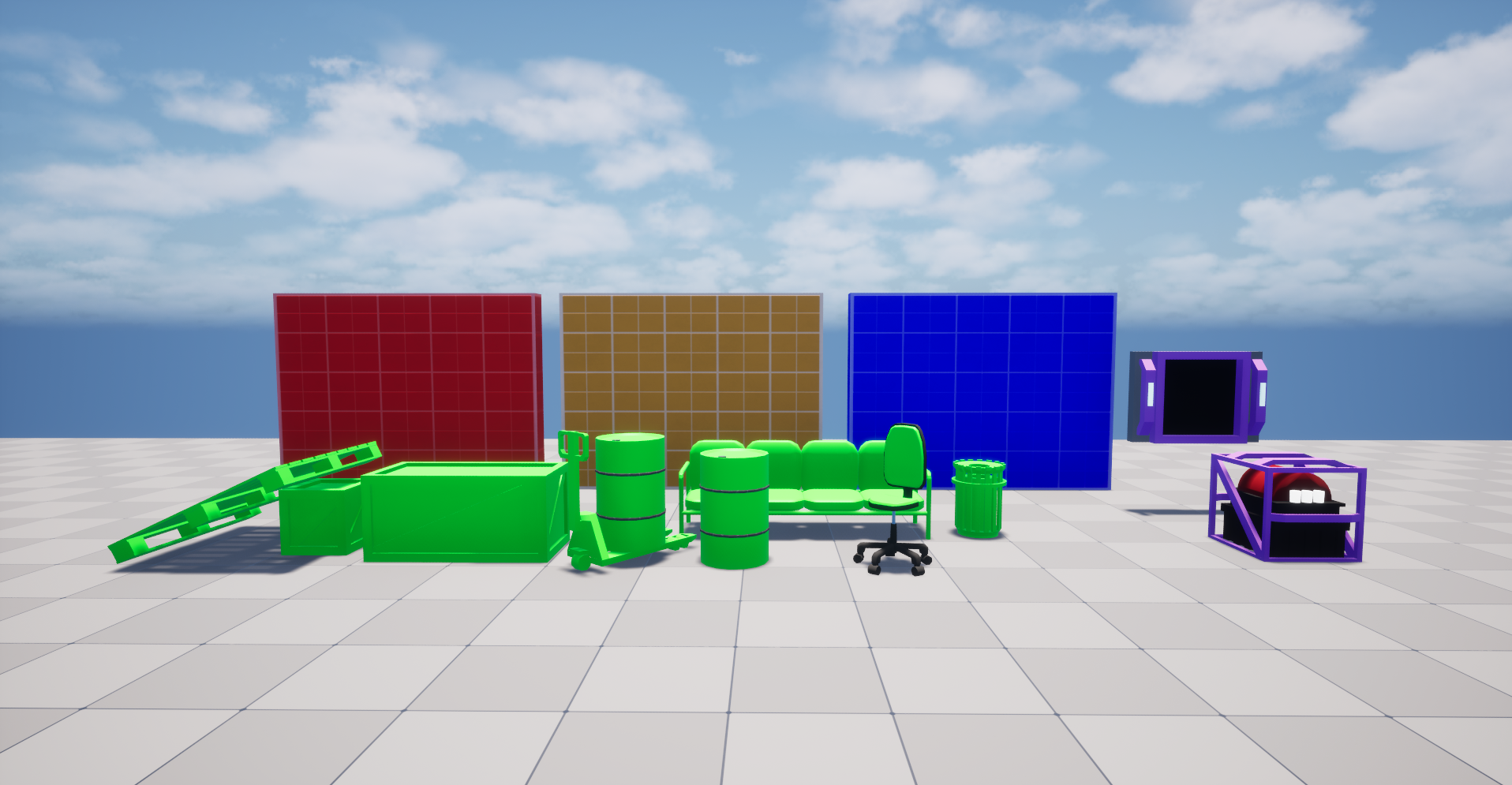
Color coded
Color coding the environment was very helpful in identifying the locations and types of objects. It proved especially useful during the blockout stage, as it made it easy to recognize what each element was. This practice is also beneficial for group projects. One specific approach was to assign different colors to each floor. This not only made the floors visually interesting but also helped distinguish them from one another, allowing me to easily identify which floor was which.
Puzzle design
puzzle 1
For the first puzzle, I wanted to make the puzzle box more interesting than simply opening doors. To do this, I connected the doors to different timed events. If the player chooses the left puzzle plate, the lift will go up. If they select the right puzzle plate, the vent fan will stop for about six seconds.
If the player places the box on the left plate first and then on the right, they will be unable to retrieve the box, as it will become stuck behind the vent when the lift moves before they can reach the top. Therefore, they need to time their actions correctly by using the right plate first, followed by the left one.
For the first puzzle, I wanted to make the puzzle box more interesting than simply opening doors. To do this, I connected the doors to different timed events. If the player chooses the left puzzle plate, the lift will go up. If they select the right puzzle plate, the vent fan will stop for about six seconds.
If the player places the box on the left plate first and then on the right, they will be unable to retrieve the box, as it will become stuck behind the vent when the lift moves before they can reach the top. Therefore, they need to time their actions correctly by using the right plate first, followed by the left one.
puzzle 2
In this second mini puzzle, I wanted to challenge the player to think more critically. The player needs to use a box that is already in use to open the lift. This allows them to access another box located underneath. Once they have this new box, they should place it on the engine and then return the original box to its original position. So both engines can be active.
In this second mini puzzle, I wanted to challenge the player to think more critically. The player needs to use a box that is already in use to open the lift. This allows them to access another box located underneath. Once they have this new box, they should place it on the engine and then return the original box to its original position. So both engines can be active.
puzzle 3
The last one of these isn't really a puzzle, but I wanted to make it more engaging than just placing the puzzle box on its plate. I decided to have the player search for it after the door closes. This choice was mainly to make use of the environment I had already built. Also, to slow down the pace of the level a bit.
The last one of these isn't really a puzzle, but I wanted to make it more engaging than just placing the puzzle box on its plate. I decided to have the player search for it after the door closes. This choice was mainly to make use of the environment I had already built. Also, to slow down the pace of the level a bit.
Combat design
Floor 1
Floor 3
Floor 3
The main focus for the combat areas was to create a large open space. This design would enhance the telekinesis mechanics, allowing players to throw objects at enemies from various distances without obstacles such as close walls or pillars getting in the way.
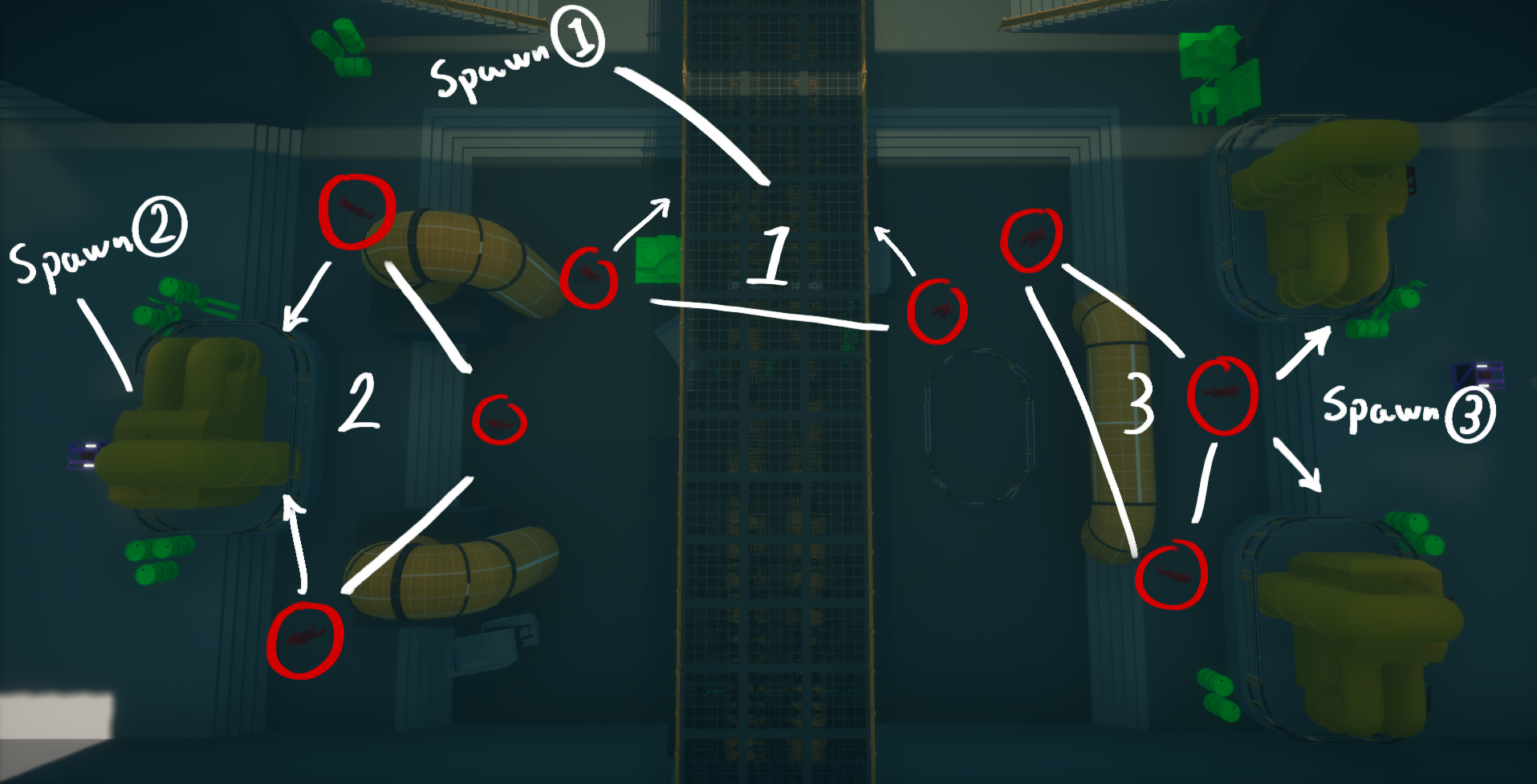
The main focus for the combat areas was to create a large open space. This design would enhance the telekinesis mechanics, allowing players to throw objects at enemies from various distances without obstacles such as close walls or pillars getting in the way.
Spawn points
The spawn points on floor 2 are activated after the engines have been turned on, which allows for a more controlled flow of the level. This also helps manage the pacing, ensuring that there is downtime between combat encounters and the task of turning on the engines.
The spawn points are located near the activated engines, so players don’t have to run across the entire level to find enemies.
The spawn points on floor 2 are activated after the engines have been turned on, which allows for a more controlled flow of the level. This also helps manage the pacing, ensuring that there is downtime between combat encounters and the task of turning on the engines.
The spawn points are located near the activated engines, so players don’t have to run across the entire level to find enemies.
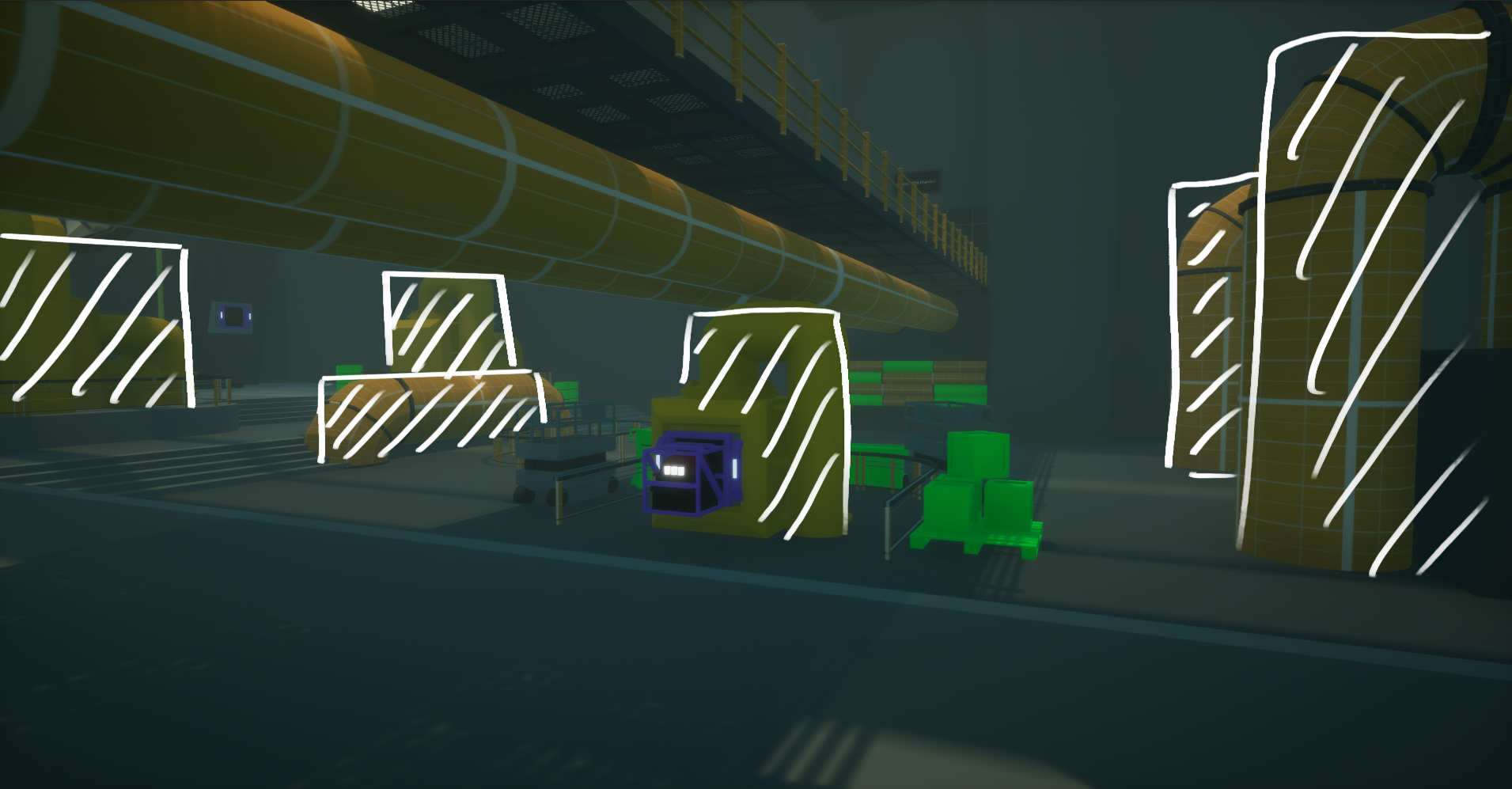
Covers
The combat area is large and open, but to ensure a fair fight, I’ve added pipes and engines that players can use for cover. This allows players to hide and avoid being seen or shot at from any angle. As a result, the entire combat area doesn’t turn into a no man's land.
The combat area is large and open, but to ensure a fair fight, I’ve added pipes and engines that players can use for cover. This allows players to hide and avoid being seen or shot at from any angle. As a result, the entire combat area doesn’t turn into a no man's land.
One of the areas of focus for this project was to achieve symmetry throughout the entire level. Symmetry can help players orient themselves and understand where they can and cannot go. However, one of the challenges was to differentiate the environments on each side to enhance the clarity of the mental map while also making the environment more interesting.
Floor 2
I used a function library to organize all the related functions for the telekinesis mechanic. By using functions, I was able to reduce the size of the blueprint graphs, which helped save space. Additionally, this approach made it easier to call functions from the library in other blueprints. The same principle applies to interfaces, allowing for more efficient code reuse without the need to rewrite it for different blueprints or without the need of a direct reference and no need for casting.
The blueprint function library included four functions related to the telekinesis mechanic. I organized the functions in this library to ensure that I could easily call them later in other blueprints. This also helped reduce the overall size of the blueprint graphs by minimizing the space taken up by having functions.
This function allows the player to throw the puzzle box at enemies. By adding an impulse to the physics handle, it can fly away quickly with force.
The grab object function checks if the player is looking at a specific grabbable item and whether they can pick it up.
Technical Design
Function library and interfaces
I used a function library to organize all the related functions for the telekinesis mechanic. By using functions, I was able to reduce the size of the blueprint graphs, which helped save space. Additionally, this approach made it easier to call functions from the library in other blueprints. The same principle applies to interfaces, allowing for more efficient code reuse without the need to rewrite it for different blueprints or without the need of a direct reference and no need for casting.
BPFL_GravityGun blueprint
The blueprint function library included four functions related to the telekinesis mechanic. I organized the functions in this library to ensure that I could easily call them later in other blueprints. This also helped reduce the overall size of the blueprint graphs by minimizing the space taken up by having functions.
Object Impulse Function
This function allows the player to throw the puzzle box at enemies. By adding an impulse to the physics handle, it can fly away quickly with force.
grab object component
The grab object function checks if the player is looking at a specific grabbable item and whether they can pick it up.
Add Overlay Material function
This function determines if it is looking at a grabbable item, allowing for changing of the overlay material on that item or object later.
This function determines if it is looking at a grabbable item, allowing for changing of the overlay material on that item or object later.
puzzle object function
The Puzzle Object function checks if the player is looking at a specific puzzle plate, if so, it can later place a puzzle box on that plate. plate.
The Puzzle Object function checks if the player is looking at a specific puzzle plate, if so, it can later place a puzzle box on that plate. plate.
A quick reflection on the entire project: I would have loved to polish some of the blueprints further, as they were not perfect and could glitch at times, particularly with the telekinesis mechanics. I would also like to incorporate more puzzles of that type into the level, utilizing the environment in a gameplay-focused way. This would ensure that players are not just fighting and running around in an interesting environment all the time.
Overall, I am very happy with how it turned out.
reflection
A quick reflection on the entire project: I would have loved to polish some of the blueprints further, as they were not perfect and could glitch at times, particularly with the telekinesis mechanics. I would also like to incorporate more puzzles of that type into the level, utilizing the environment in a gameplay-focused way. This would ensure that players are not just fighting and running around in an interesting environment all the time.
Overall, I am very happy with how it turned out.